

Vibe Coding Lab #3: The Agent That Finds Your Best Distribution Channel
How I vibe-coded a channel research pipeline that interviews you, scans your competitors, and finds the best channels to build on

Somewhere around my sixth month of building Shezaar, I was posting on LinkedIn, Instagram, TikTok, Substack, and Reddit because every founder I knew had a presence on at least one of them and I had no better way to figure out where I should be. Two months of that got me some polite comments and likes from the same people across platforms, exactly zero leads, and a mild skill at editing short videos.
Then I burned out and stopped everything for a month.
The distribution problem for solo founders is not that we do not know social media presence matters. We know it does. The problem is that there is no reliable way to figure out which channel is worth the specific hours, given our voice and audience and what we want to accomplish.
So we pick based on what other founders are doing, or what we last read about, or where we feel most comfortable posting. To find out whether it was the right call only after six months.
So, naturally I built something to help with this. Channel Scout is a six-skill pipeline that does what a “distribution consultant” or “GTM consultant” (if they exist) does, running locally on your Claude Pro or Max subscription with no API keys and no extra cost.
Here are the only two commands:
/channel-scout is the full strategy session. This is what you run the first time. It interviews you, scans your competitors, selects a channel, designs kill criteria, tests post drafts. So that by the end, you have two channels to bet on and a metric that tells you when something is not working out.
/channel-scout coach is the daily run. One coaching note, one dashboard refresh, one check of your kill criteria. Runs automatically if you want, or can be triggered manually.
Before You Start
This is built for Claude Code, so you need a Pro or Max plan. If you have never used Claude Code before, the install takes about five minutes and there are tutorial links in the README.
How It Works
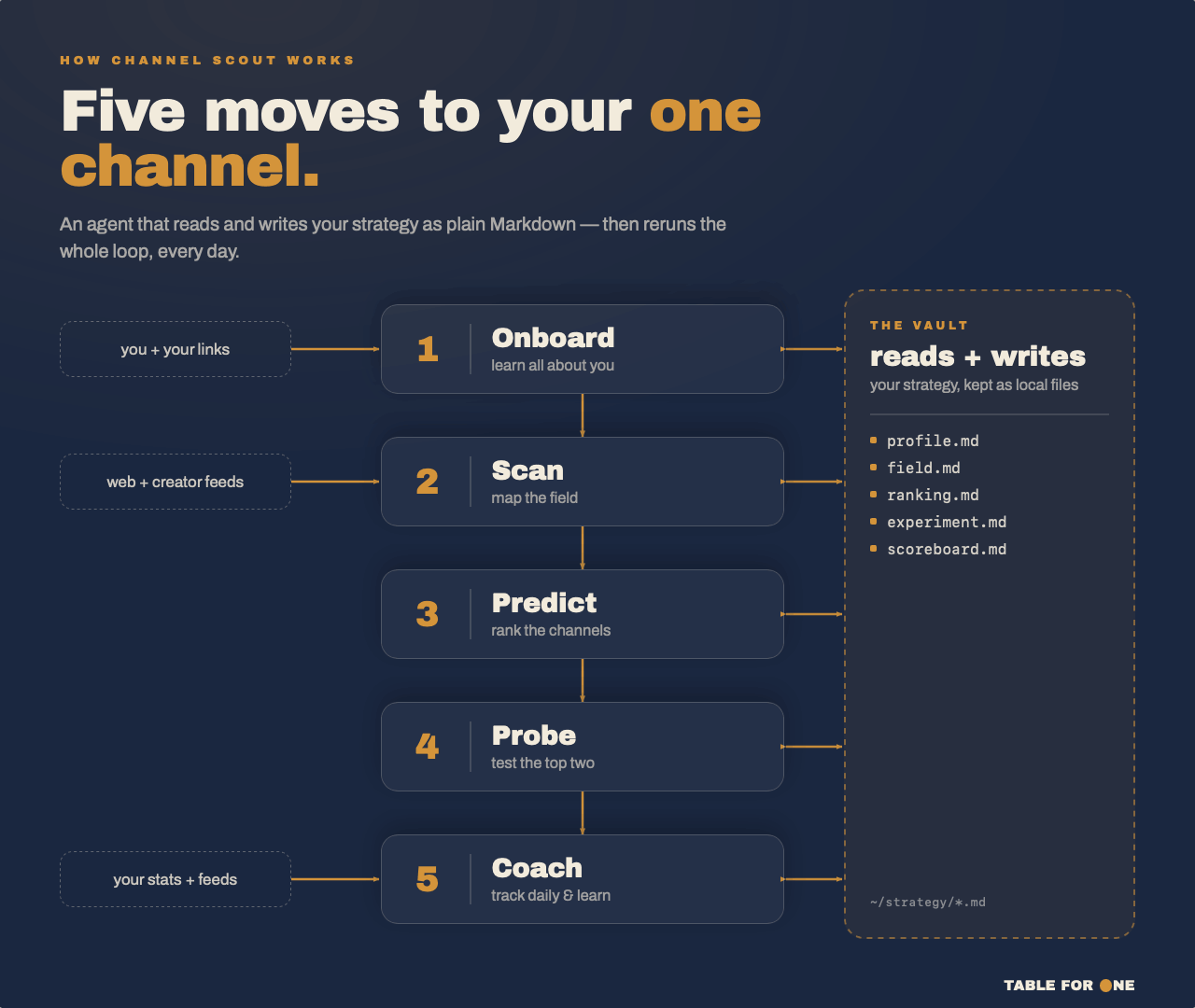
The first time you run /channel-scout, five skills fire in sequence. The full session runs under 90 minutes, with natural stopping points if you need to break. If you stop mid-way, running /channel-scout again picks up exactly where you left off.
These are the five skills:
ONBOARD interviews you, asking what you are building, who it is for, your three closest competitors, how many hours per week you can give to distribution, and what channels you have already tried. While you answer, it fetches your information and homepage in the background to create specific search parameters, ICP descriptors, and competitor feed. By the end of the interview, Channel Scout knows your constraints.
SCAN uses those parameters to fetch competitor information and find three to five channels that would work for you. For each channel it identifies, it extracts the winning content template: the hook pattern that gets traction on that platform, the typical post length, the posting cadence that works. It rates each channel on audience saturation, content gap, and ICP fit.
PREDICT is the part I found hardest to build manually. It scores voice fit for each channel, meaning how much rewriting your natural writing style would need to work on that platform. Then it runs something I called a wind tunnel: three synthetic personas built from real top-performing post language on each channel. Your angle goes through all three.
Channels that would require more weekly hours than you said you have get penalized. At the end, PREDICT picks two channels and writes the full reasoning to a prediction file you can read, question, and push back on.
PROBE drafts two native test posts per channel in your voice, sets your posting cadence from the intel data, and writes kill criteria. Not “give it three months and see.” Specific numbers. If LinkedIn impressions stay below 180 after seven posts, stop. You agree to that number before the first post goes out.
COACH runs every morning, reading a rolling context stack: not your full history, just your scorecard, yesterday’s summary, and the most recent weekly synthesis. It checks your kill criteria, writes one coaching note, and regenerates your dashboard, opening it automatically.
The Number That Matters
The problem was not that I picked the wrong channels. I picked five channels at once, had no criteria for any of them, and burned out before a single one could tell me anything useful. Had I run some experiment like Channel Scout first, it would have surfaced two channels worth betting on and given me a number to watch after the first post went out. It would have told me that given my ICP, my strongest channels were Substack and Reddit.
That is the piece I would have wanted before I opened a TikTok account in 2025.
Now this is not a content system and I am building an individual system for each channel. But those will work only after you have identified the right channels for you.
How To Install It
Two commands in Claude Code:
/plugin marketplace add DM1195/tableforone-channel-scout
/plugin install channel-scout@tableforone-channel-scout
Then type:
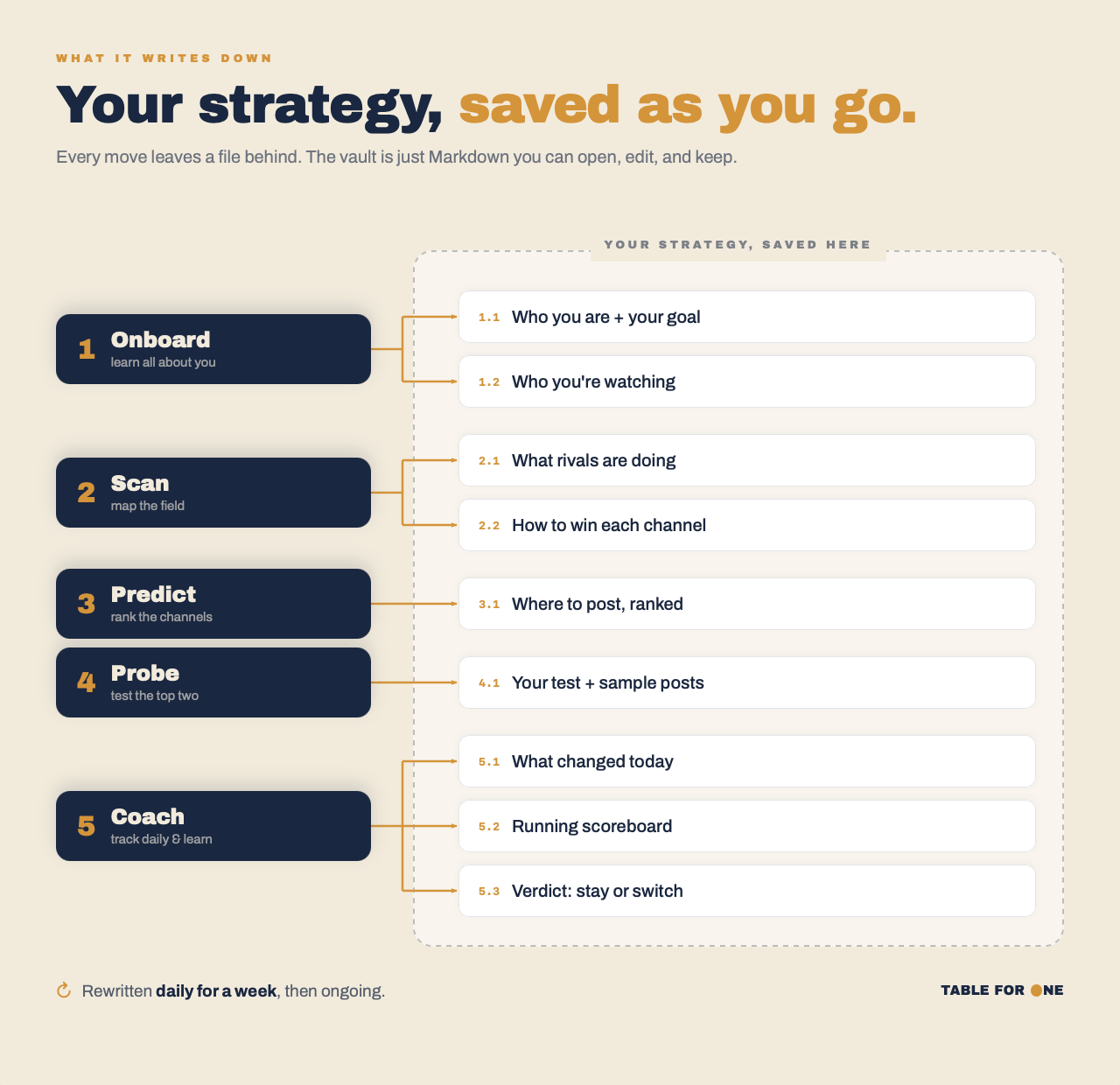
/channel-scoutChannel Scout asks for your company name, creates a folder at ~/channel-scout/[your-company]/, and starts the ONBOARD interview. Answer in plain English. Ten minutes in you will have a profile and a watchlist. By end of session you will have two channels to test, two draft posts per channel in your voice, and a kill criteria number for each.
All files live locally. Nothing is sent anywhere. Nothing expires.
The Daily Coach
At the end of your first session, you choose how the daily run works.
Automatic registers a launchd task on Mac or a crontab on Linux that fires at your chosen time. If your laptop was asleep, it runs when you open it.
On open adds a SessionStart hook to your Claude Code settings so the coaching run starts every time you open Claude Code.
Manual means you run /channel-scout coach yourself.
The coaching note is short. Post performance against kill criteria. What shifted in the competitor feeds overnight, if anything changed. One specific recommendation for today.
The dashboard is a static HTML file Channel Scout regenerates after every coach run: scorecard table, today’s note, competitor activity, kill criteria status in one page.
Channel Scout does not read your full post history every morning. It reads the rolling stack, and competitor feeds only get fetched if something actually changed since the last run. That is token discipline built into the design. A daily process should not become an expensive one.
What I’d Do Differently
I tried to make the PREDICT output final. Two channels, full reasoning, done. But the wind tunnel results surprised me often enough that I wanted to be able to push back on the picks. The tool now writes the full reasoning to prediction.md, and if you run /channel-scout again and tell it you want to revisit a pick, it re-runs PROBE with adjusted parameters instead of just confirming the first output.
I wish I had designed for that iteration loop from the start. The first version assumed the model would always surface the same two obvious channels. It does not, and the divergence cases are often the more interesting ones.
If the channel picks surprise you, or something breaks on your setup, reply and tell me what it gave you.
Durva
