

Vibe Coding Lab #2: The Tool To Help You Visualize Your Product
I built a tool to see inside the app I vibe-coded

You vibe-coded something. It worked for a while and then something broke. And there was no way for you to easily fix it.
So you’re three hours deep asking Claude to “find the issue” and it’s finding things, but none of them are the actual thing.
I’ve been there.
When you vibe-code, the AI builds fast and you ship faster. Somewhere in between, the code outpaces your understanding of it. The logic exists, but it exists in the AI’s “head”, not yours. So when something breaks, you can’t point to what or where. You grep through files. You ask Claude for help without being specific. You’re scared to delete anything because you don’t know what depends on it.
That’s not a skill issue. That’s a visibility issue.
Sprintt is the agent library I’m building for solo founders. It has 127 functions and 42 dependencies across 28 features. I built every one with Claude. Until last week, I couldn’t tell you what most of them did. I was exactly where you are.
So I built a tool that shows you what’s there.
Overview Of The Skill: What It Does
This simple and free claude skill helps you visualize your vibe-coded product and identify the gaps you could have missed. Point it at any project folder. A browser tab opens with three views of your codebase: three different ways of looking at the same code, depending on what you’re trying to figure out.
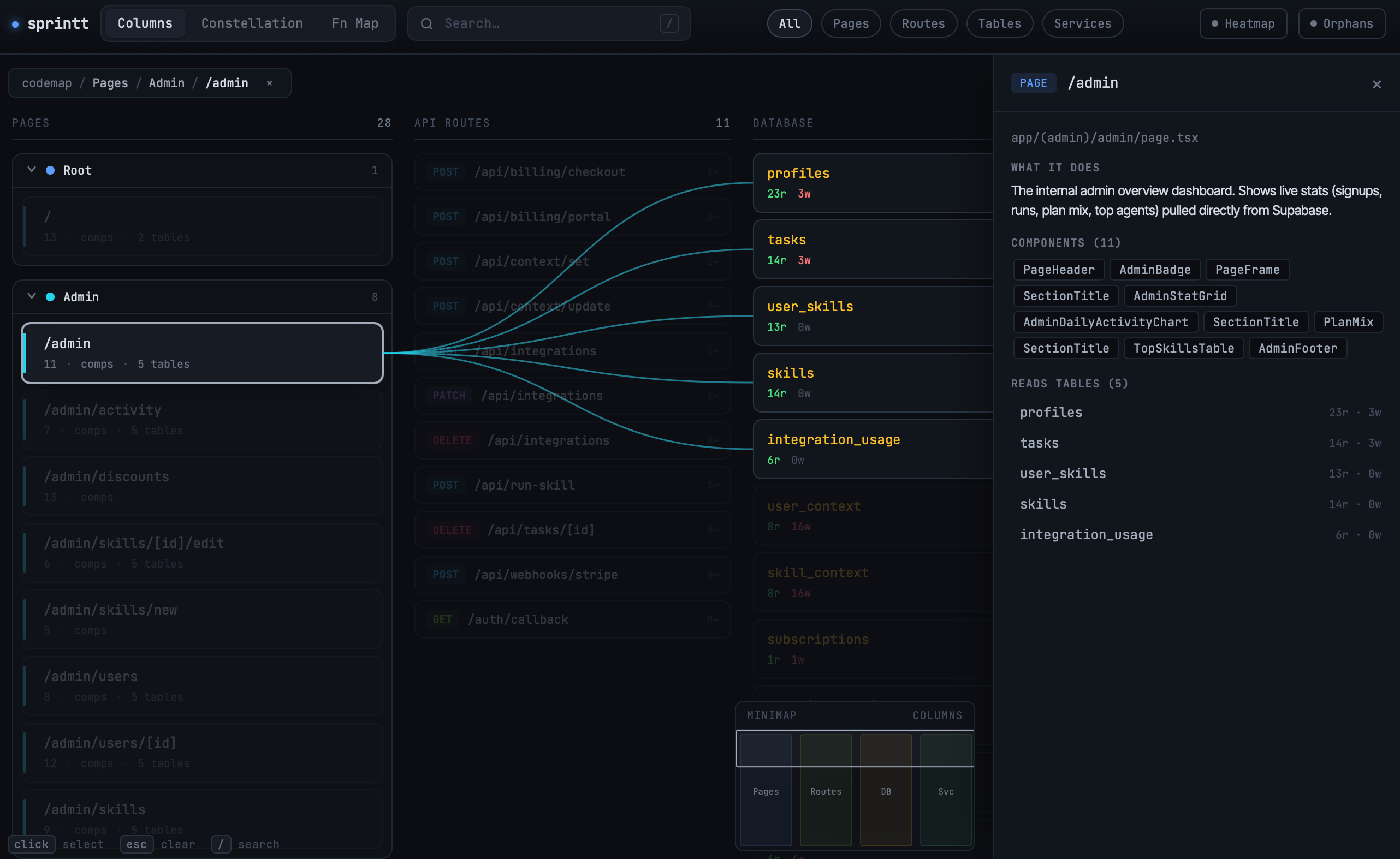
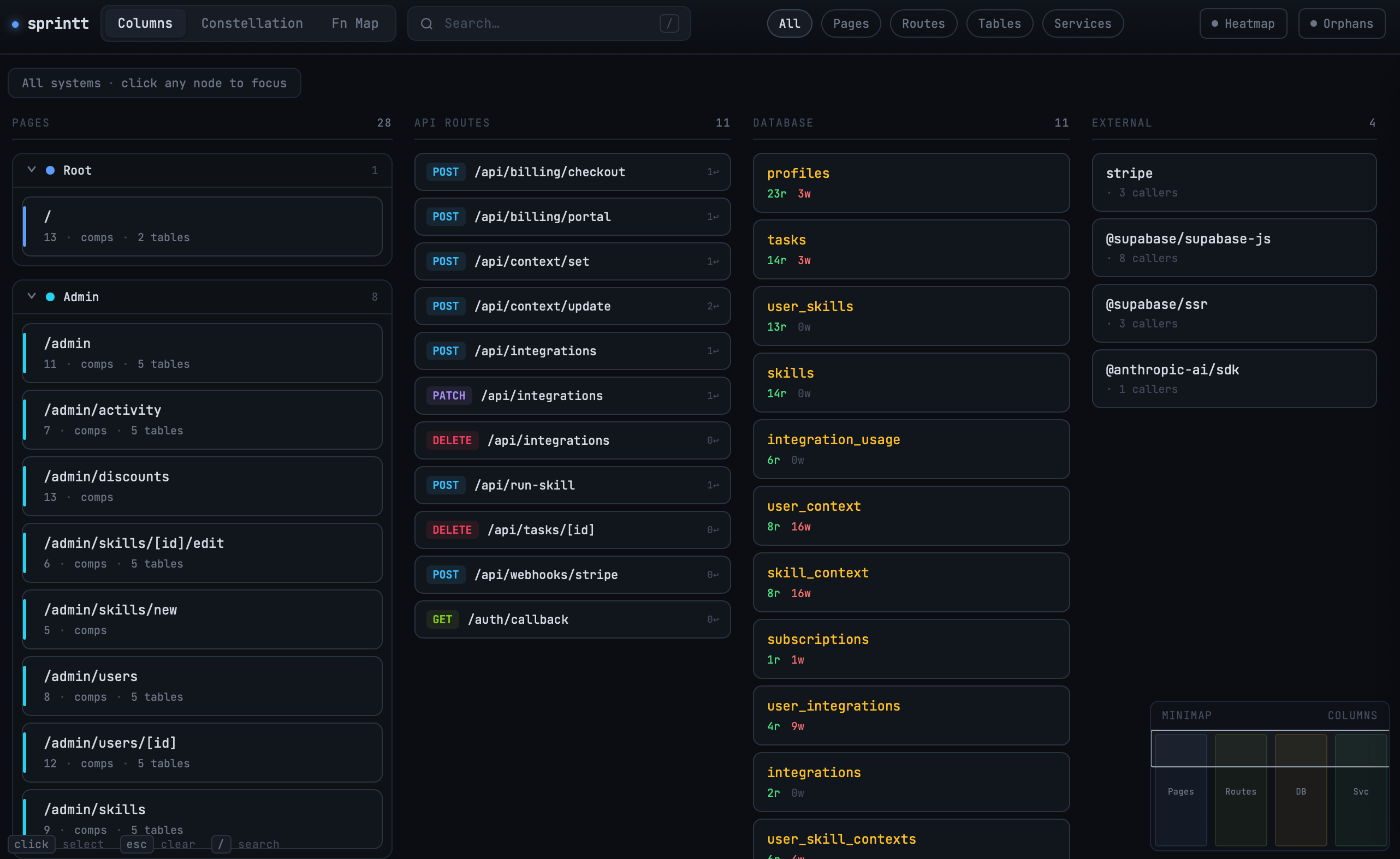
App Flow:
Three columns: pages on the left, database tables in the middle, external services and API routes on the right. Pages are grouped by URL section: all your /admin/* pages together, all your /onboarding/* together etc. Each page is a card you can expand to see the components inside it. Each component shows what data it queries, where it navigates, what server actions it calls. Arrows connect components to the specific tables and services they touch.
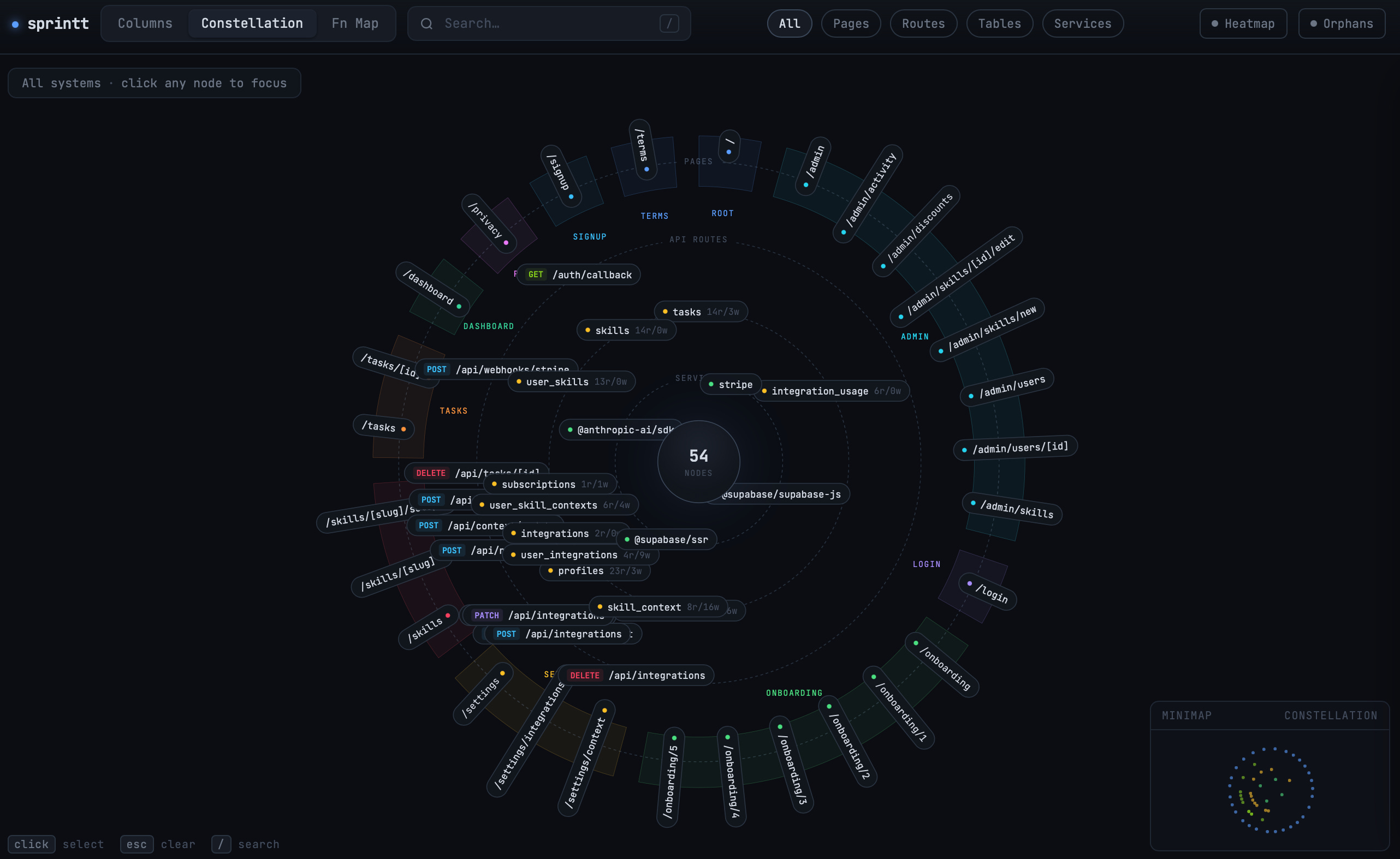
Constellation:
Same data, radial layout. Four concentric rings: pages on the outside, then API routes, then database tables, external services at the center. Routes and tables don’t sit randomly. They gravitate toward the pages that use them. If your agents table is read by both dashboard and admin pages, it floats between those sections. The layout shows you something no file tree does: how siloed or shared each resource actually is.
Function Map:
Every function in the codebase as a block, grouped by file. Click one to see what calls it and what it calls. Dead code flagged. Linter issues surfaced. Claude writes a plain-English explanation of what each function does, and if it has bugs, generates a ready-to-paste fix prompt for Cursor. This is the deep-dive view for when something’s broken and you need to actually trace it.
Two toggles work across the views:
Heatmap. Colors nodes by connection count. Tables go blue for reads, red for writes. Pages get more saturated the more routes call them. Lets you see at a glance which tables are your hottest and which pages are doing the most work.
Orphans. Highlights anything with zero connections. A page no route leads to. A table nothing reads. A service nothing imports. Orphan doesn’t always mean broken. Sometimes the connection is dynamic, sometimes the analyzer missed it. But now you have something specific to investigate instead of a vague sense that something’s off.
Your code never leaves your machine.
How To Get It Running
Two ways. Pick one.
The Fast Way (1 Minute)
If you have Claude Code installed and don’t mind downloading from my free GitHub repo, paste these two commands:
/plugin marketplace add DM1195/tableforone-codebase-visualizer
/plugin install codebase-visualizer@tableforone-codebase-visualizer
Then in any project, ask Claude Code: “map my codebase” and point it to a folder.
Build It Yourself
If you’d rather build it yourself, or customize it for your stack, it’s five prompts run in sequence in Claude Code, about 30 to 45 minutes. The prompts produce the function-level analyzer, the app flow parser, the visualization, the constellation layout, and the skill wrapper that orchestrates it all.
The full prompts, the design constraints, and the gotchas are in this doc. One thing to note: don’t paste all five at once. Run each, see what you get, fix what’s off, then move on.
The plugin is open source. Repo here. The doc has the full setup, all five prompts, and a few features I cut from this post for length.
What This Is Really About
The work isn’t writing code anymore. The work is seeing what you built.
Once you’ve shipped something you can’t see inside, your options narrow fast: abandon it, or rebuild it from scratch. Most founders pick one of those after losing weeks. The hope is that now you don’t have to.
If something doesn’t work, send me a message. Wrong stack, missing feature, broken on your setup, whatever it is. I’d rather know than have you hit a wall and give up on it.
And if you’re a solo founder trying to figure out how to build and ship without a team behind you, Table For One is where I write. The tools, the decisions, the mistakes, written specifically for people building solo. Free to subscribe.
- Durva